finding the relative orientation#
After pre-processing the images, the next step in processing is to compute the intrinsic camera parameters, and find an initial external orientation for the images. At this stage, this is done in an arbitrary, relative coordinate system.
Tapas#
The basic tool for computing relative orientation in MicMac is Tapas:
mm3d Tapas <ModeCalib> <Pattern>
which can also be called using the spymicmac.micmac.tapas() wrapper. In order to run Tapas, you need to
specify a Calibration Mode - that is, the type of calibration to use.
MicMac has a number of calibration modes available - to see a full list, use the following command:
mm3d Tapas -help
which will print something like the following list:
Authorized models :
   RadialBasic
   RadialExtended
   Fraser
   FishEyeEqui
   AutoCal
   Figee
   HemiEqui
   RadialStd
   FraserBasic
   FishEyeBasic
   FE_EquiSolBasic
   Four7x2
   Four11x2
   Four15x2
   Four19x2
   AddFour7x2
   AddFour11x2
   AddFour15x2
   AddFour19x2
   AddPolyDeg0
   AddPolyDeg1
   AddPolyDeg2
   AddPolyDeg3
   AddPolyDeg4
   AddPolyDeg5
   AddPolyDeg6
   AddPolyDeg7
   Ebner
   Brown
   FishEyeStereo
The basic syntax is (here, using RadialExtended):
mm3d Tapas RadialExtended "OIS.*tif"
though typically, we save this orientation as “Relative”:
mm3d Tapas RadialExtended "OIS.*tif" Out=Relative
initializing a calibration#
With a large number of images, it might help to create an initial calibration based on a few “nice” images (i.e., plenty of tie points/contrast) before trying to run the calibration on the entire set of images:
mm3d Tapas RadialExtended "<Image>(1-5).tif" Out=CalibInit SH=HomolMasqFiltered LibFoc=0
This will create an initial directory, Ori-CalibInit, based on the images specified by the search pattern. Once
you have a stable initial calibration, you can use this to seed the calibration for the entire block of images:
mm3d Tapas RadialExtended "OIS.*tif" InCal=CalibInit Out=Relative SH=HomolMasqFiltered LibFoc=0
This will create a new directory, Ori-Relative, that contains orientation files for each of the different images
in the directory, as well as the calibration file for each camera specified in
MicMac-LocalChantierDescripteur.xml.
visualizing the orientation#
If Tapas successfully completes, you can then create a point cloud to visualize the relative orientation and
inspect it for any errors:
mm3d AperiCloud "OIS.*tif" Relative
alternatively, with spymicmac.micmac.apericloud():
from spymicmac import micmac
micmac.apericloud('Relative')
You can then open the .ply file using, for example, Cloud Compare or
Meshlab:
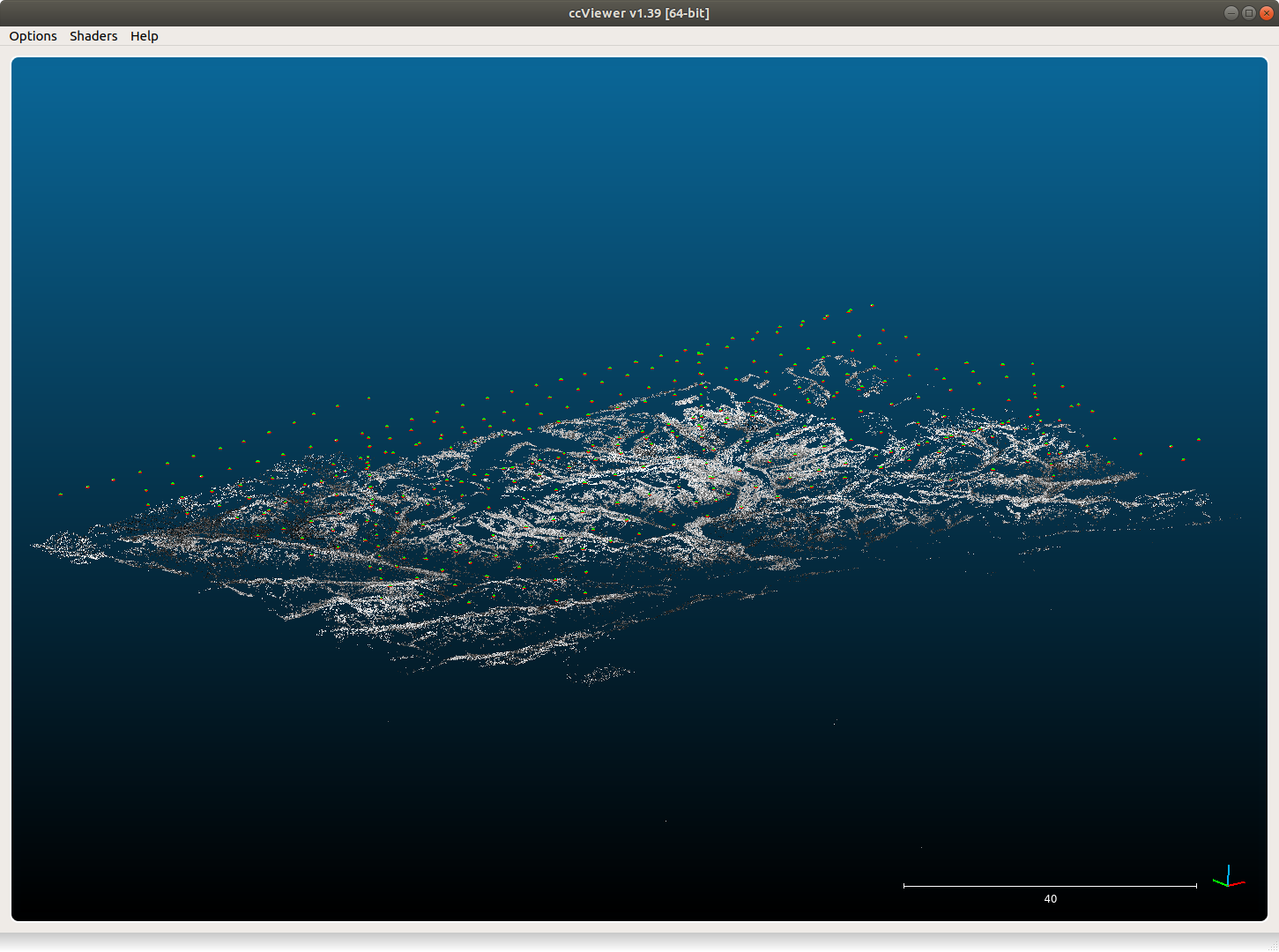
KH-9 Hexagon mapping camera#
For KH-9 Hexagon mapping camera processing, spymicmac uses
RadialExtended by default, which uses 5 polynomial
coefficients to estimate the radial distortion: \(r^3, r^5, r^7, r^9, r^{11}\).
To help initialize the calibration, spymicmac.preprocessing.preprocess_kh9_mc() uses
spymicmac.micmac.init_autocal() to create a directory with calibration files, Ori-Init,
that can be passed to Tapas using InCal=Init.
Because Tapas with RadialExtended is likely to diverge due to the number of degrees of freedom and residual
distortion in the images, the default behavior in spymicmac.preprocessing.preprocess_kh9_mc() is to hold the
focal length, center of distortion, and principal point constant (LibFoc=0, LibCD=0, and LibPP=0,
respectively):
mm3d Tapas RadialExtended "OIS.*tif" InCal=Init Out=Relative LibFoc=0 LibCD=0 LibPP=0
This typically works well as an estimate for the camera distortion, but it is also possible to combine the higher-order
distortion model used by RadialExtended with affine and decentric correction parameters, as used in models such as
Fraser or FraserBasic.
If you are using spymicmac.preprocessing.preprocess_kh9_mc(), using add_params=True will initialize the
decentric and affine correction parameters with a value of 0; if the bundle block adjustment using Campari is
run with AllFree=1, these parameters will also be optimized at this stage.
If you are not using spymicmac.preprocessing.preprocess_kh9_mc(), you can still add these parameters to the
higher-order distortion model in the following way:
from spymicmac import micmac
cam = micmac.load_cam_xml(fn_cam)
micmac.write_cam_xml(fn_cam, cam, fraser=True)
where fn_cam the name of the camera XML file to read/write.
Caution
This feature has not been tested on all available calibration modes used by Tapas, so use with caution!
Martini#
Martini is a MicMac command that can be extremely useful for creating an initial orientation that can be used by
Tapas:
*****************************
*  Help for Elise Arg main  *
*****************************
Mandatory unnamed args :
  * string :: {Image Pat}
Named args :
  * [Name=Exe] bool :: {Execute commands, def=true (if false, only print)}
  * [Name=OriCalib] string :: {Orientation for calibration }
  * [Name=SH] string :: {Prefix Homologue , Def=""}
  * [Name=ExtName] string :: {User's added Prefix , Def=""}
  * [Name=ExpTxt] bool :: {Homol in text format? , Def="false"}
  * [Name=ModeNO] string :: {Mode Def=Std (TTK StdNoTTK OnlyHomogr)}
  * [Name=InOri] string :: {Existing orientation if any}
  * [Name=OriOut] string :: {Output orientation dir}
  * [Name=OriGPS] string :: {Orientation where find gps data when exists}
  * [Name=OriCheck] string :: {Reference Orientation  to check results}
  * [Name=Debug] bool :: {Debug ....}
  * [Name=AUS] bool :: {Accept non symetric homologous point;}
  * [Name=Quick] bool :: {If true (default) do less test}
  * [Name=StdNbPtTrip] INT :: {Max num of triplets per edge (Std mode)}
  * [Name=QNbPtTrip] INT :: {Max num of triplets per edge (Quick mode), Def=8}
  * [Name=NbTrip] INT :: {Min num of points to calculate a triplet}
  * [Name=Show] bool :: {If true (non default) print (a lot of) messages}
A python interface for Martini is implemented in spymicmac.micmac.martini(). Because Martini uses
tie points to orient images without also adjusting for camera distortion, it’s better to visualize the point cloud
without also seeing the tie points:
mm3d AperiCloud "OIS.*tif" Martini WithPoints=0
This will create a .ply file with only the camera centers drawn:
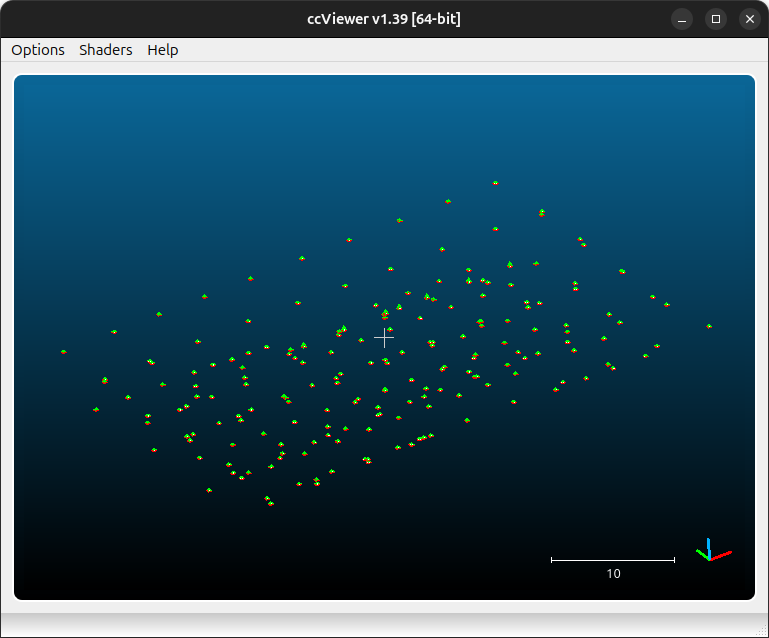
Alternatively, this can be done with with python, using spymicmac.micmac.martini() and
spymicmac.micmac.apericloud():
from spymicmac import micmac

micmac.martini('OIS.*tif')
micmac.apericloud('Martini', 'OIS.*tif', with_points=False)
fixing the orientation#
If your Tapas output looks okay, you can move on to the next step, computing the relative dem and orthophoto.
If you are unlucky, however, there are some tools in spymicmac.orientation() to help manipulate the orientation
files to help Tapas converge. For example, occasionally cameras will be positioned in an incorrect location,
especially images with lots of ice/snow.
If the absolute camera positions are (approximately) known, spymicmac.orientation.fix_orientation() will
estimate an affine transformation between the known absolute positions and the relative positions estimated by Tapas.
Outliers are identified by comparing the normalized median absolute deviation (NMAD) of the residuals, and the camera
positions in the orientation file are overwritten with the position estimated from the transformation using
spymicmac.orientation.update_center().
Note
Once you have updated the center locations with the new estimated positions, you should re-run Tapas
using InOri=<Updated Orientation>:
mm3d Tapas RadialBasic "OIS.*tif" InOri=Relative Out=Relative LibFoc=0
In most cases (but not always!), seeding the locations in this way will help Tapas converge to a
more accurate solution.
In the example shown below, two images (marked with red squares) have been identified as outliers using the estimated
transformation. The positions have been updated using spymicmac.orientation.fix_orientation(), and re-running
Tapas has helped position the cameras correctly:
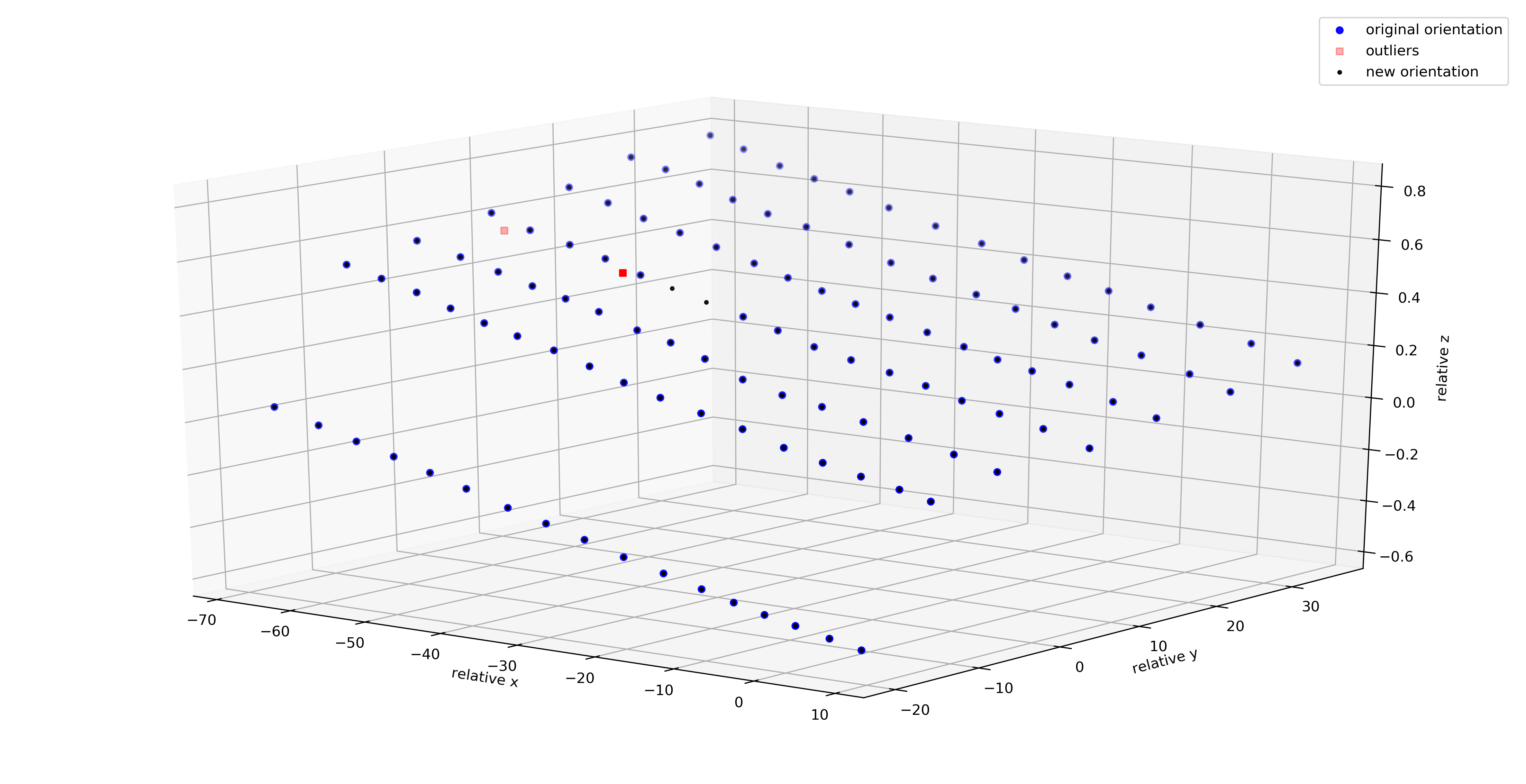
If the camera positions are not well-known (often the case for historic air photos), you can use
spymicmac.orientation.interp_line() or spymicmac.orientation.extend_line() to estimate the positions
based on an assumed flight line, using positions that have converged properly.
Once you have the new positions estimated, you should update the positions in the orientation files using
spymicmac.orientation.update_center(), and re-run Tapas as shown above.