tutorials#
Here, you will find information about the workflow for using spymicmac to process KH-9 mapping camera and historic air photos.
The basic workflow looks like this:
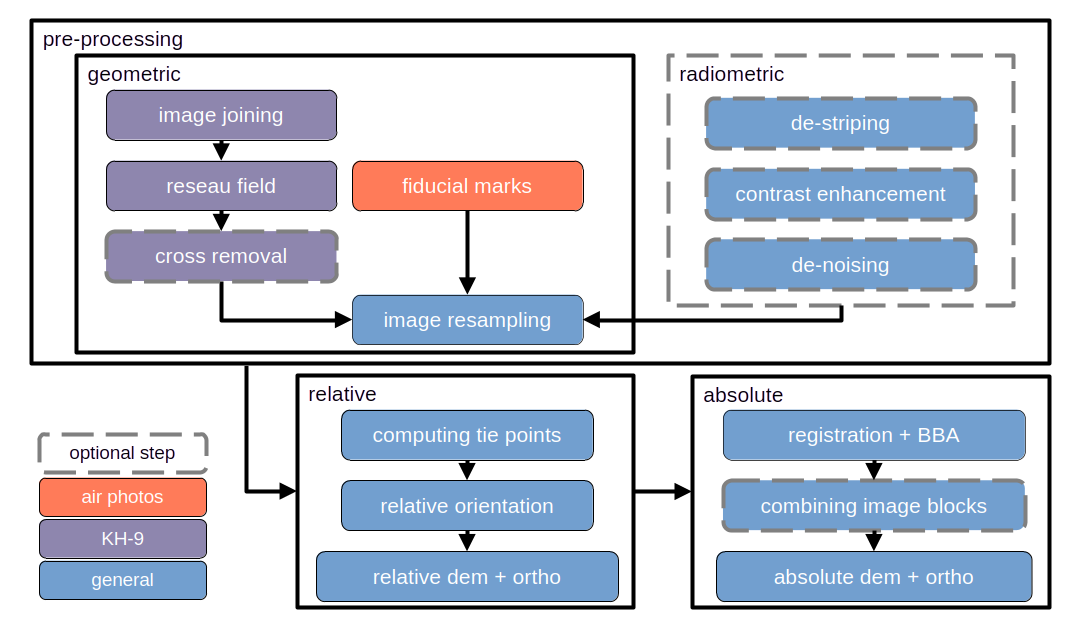
This can be divided into four main steps: initial setup, pre-processing, relative geometry, and absolute geometry:
initial setup covers the different files that are necessary for processing using MicMac
pre-processing covers all of the steps taken to get the images ready for processing, and includes both geometric pre-processing and radiometric pre-processing.
relative geometry covers all of the steps taken to estimate the intrinsic camera parameters (e.g., principal point, radial distortion, affine/decentric correction) and the relative external orientation of the images.
absolute geometry covers all of the steps taken to process the images in an absolute (“real-world”) geometry: registration and bundle block adjustment (BBA), dense matching and orthorectification.
If you don’t want to read more about the different processing steps, there is also a tl;dr guide which runs through the different tools and commands used in the workflow with minimal explanation. :)