réseau grid#
To help re-sample images to a common format, and to correct some of the distortion in the images caused by film
storage, spymicmac.matching() includes a routine to automatically find the réseau markers in the image and
use their locations to resample the images using spymicmac.resample.resample_hex().
In the images below, you can see the difference between the expected location of each réseau marker and the automatically detected locations:

To run the routine, use either spymicmac.matching.find_reseau_grid() or
find_reseau_grid. This will produce a MeasuresIm file that will be read by
spymicmac.resample.resample_hex().
Note
Before running spymicmac.resample.resample_hex(), you will also need to run
spymicmac.micmac.generate_measures_files() (or generate_measures_files)
in order to generate the MeasuresCamera.xml file needed, then move MeasuresCamera.xml to the
Ori-InterneScan directory in the correct folder.
If you are running these steps using spymicmac.preprocessing.preprocess_kh9_mc() or
preprocess_kh9_mc, these files will be automatically generated.
cross removal#
Once you have found the Reseau marks in each image half, you can “remove” the Reseau marks using either
spymicmac.matching.remove_crosses() or remove_crosses.
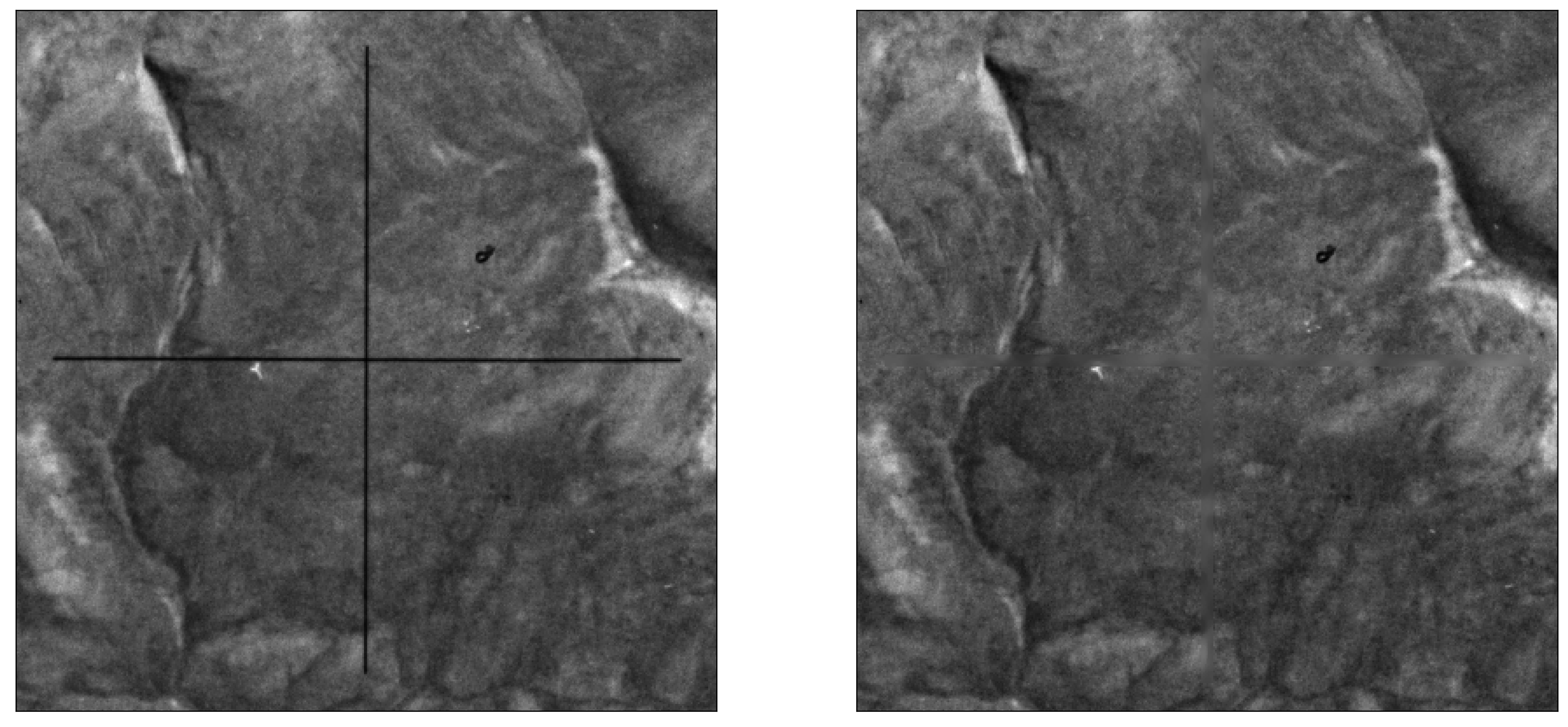
After this step, you can use resample_hexagon.
Tip
Because mm3d ReSampFid calculates an affine transform based on the fiducial marker locations, it does not
actually correct the image using the marker locations. For KH-9 Mapping Camera images, it’s better to use
resample_hexagon.